Vuex3
state
State提供唯一的公共数据源,所有共享的数据都要统一放到Store的State中进行存储
import Vue from 'vue'
import App from './App-1.vue'
import Vuex from 'vuex'
// import Vant from 'vant';
// import 'vant/lib/index.css';
// import 'amfe-flexible'
// Vue.use(Vant);//vant组件库
Vue.use(Vuex)//vuex状态管理
Vue.config.productionTip = false
//创建store对象
const store = new Vuex.Store({
  state: { count: 0 }
})
new Vue({
  //将store对象挂载到vue实例中
  //所有的组件可以直接从store中获取全局的数据
  store,
  render: h => h(App)
}).$mount('#app')
组件访问State中数据的第一种方式:通过插值表达式
this.$store.state.全局数据名称
<h3>当前最新count值为: {{this.$store.state.count}}</h3>
组件访问State中数据的第二种方式:mapState 辅助函数
//按需导入mapState 函数
import { mapState } from 'vuex'
mapState(['count'])
通过导入的mapState 函数 ,将当前组件需要的全局数据,映射为当前组件的cpmputed计算属性
<template>
  <div>
    <h3>当前最新count值为: {{count}}</h3>
    <button>-1</button>
  </div>
</template>
<!-- 将全局数据,映射为当前组件的计算属性 -->
<script>
import { mapState } from 'vuex'
export default {
  computed: {
    ...mapState(['count'])
    //利用展开运算符将导出的状态映射给计算属性
  },
};
</script>
等价于:
export default {
  computed: {
    // ...mapState(['count'])
    //利用展开运算符将导出的状态映射给计算属性
    count() {
      return this.$store.state.count
    }
  },
};
Mutation
Mutation用于修改Store中的数据
- 只能通过mutation变更Store中的数据,不可以直接操作Store中的数据
- 通过mutation 方式可以集中监控所有数据的变化
不推荐直接修改State
<template>
  <div>
    <h3>当前最新count值为:{{ this.$store.state.count }}</h3>
    <button @click="btn">+1</button>
  </div>
</template>
<script>
export default {
  methods: {
    btn() {
      this.$store.state.count++
    }
  },
};
</script>
第一种方式:this.$store.commit( )
正确的操作:定义mutation
const store = new Vuex.Store({
  state: { count: 0 },
  //定义mutation
  mutations: {
    add(state) {//state就是当前的state
      //变更状态
      state.count++
    }
  }
})
正确的操作:触发mutation
<template>
  <div>
    <h3>当前最新count值为:{{ this.$store.state.count }}</h3>
    <button @click="btn">+1</button>
  </div>
</template>
<script>
export default {
  methods: {
    btn() {
      this.$store.commit('add')
    }
  },
};
</script>
传递参数
可以在触发 mutations 时传递参数
//创建store对象
const store = new Vuex.Store({
  state: { count: 0 },
  //定义mutation
  mutations: {
    // add(state) {//state就是当前的state
    //   //变更状态
    //   state.count++
    // }
    addN(state ,step) {//state就是当前的state
      //变更状态
      state.count = state.count +step
    }
  }
})
export default {
  methods: {
    // btn() {
    //   this.$store.commit('add')
    // }
    btn() {
      this.$store.commit('addN',3)
    }
  },
};
第二种触发方式
this.$store.commit(' ')是第一种触发mutations 的方式,触发mutations 的第二种方式
import {mapState, mapMutations } from 'vuex'
...mapMutations(['sub','subN']),
// main.js
const store = new Vuex.Store({
  state: { count: 0 },
  //定义mutation
  mutations: {
    //自增
    add(state) {//state就是当前的state
      //变更状态
      state.count++
    },
    //加3
    addN(state, step) {//state就是当前的state
      //变更状态
      state.count = state.count + step
    },
    //自减subN
    sub(state) {
      state.count--
    },
    subN(state ,step) {
      state.count = state.count - step
    }
  }
})
<template>
  <div>
    <h3>当前最新count值为:{{ this.$store.state.count }}</h3>
    <button @click="btn">+1</button>
    <button @click="btnN">+N</button>

  </div>
</template>
<script>
export default {
  methods: {
    btn() {
      this.$store.commit('add')
    },
    btnN() {
      this.$store.commit('addN',3)
    },

  },
};
</script>
<template>
  <div>
    <h3>当前最新count值为: {{ count }}</h3>
    <button @click="subBTN_1">-1</button>
    <button @click="subBTN_2">-N</button>

  </div>
</template>
<script>
import { mapState, mapMutations } from 'vuex'

export default {
  computed: {
    ...mapState(['count']),
  },
  methods: {
    ...mapMutations(['sub', 'subN']),
    //将全局 mutations 的sub 映射为当前组件的一个methods
    subBTN_1() {
      this.sub()
    },
    subBTN_2() {
      this.subN(3)
    },

  },
};
</script>
Action
不要在 mutations 函数中,执行异步操作
  mutations: {
    //自增
    // 不要在 mutations 函数中,执行异步操作
    add(state) {
      setTimeout(() => {
        state.count++
      })
    },
 }
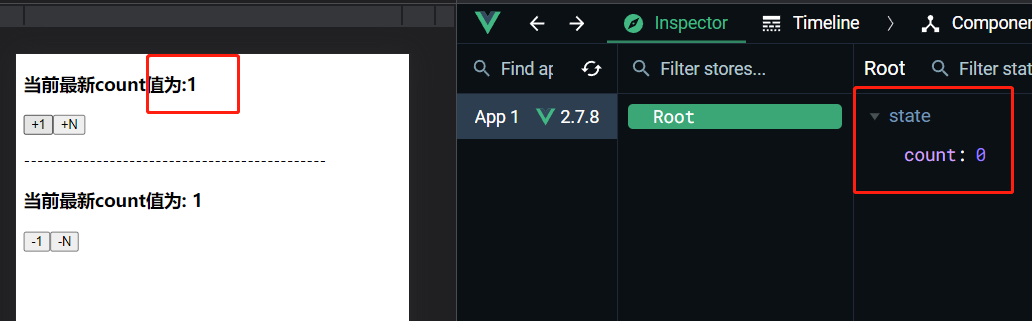
Action用于处理异步任务
如果通过异步任务变更数据,必须通过Action 而不能使用mutation ,但是Action中还是要通过触发mutation的方式间接变更数据
const store = new Vuex.Store({
  state: { count: 0 },
  //定义mutation
  //只有mutation中定义的函数,才有权利修改state中的数据
  mutations: {
    add(state) {
      // setTimeout(() => {
      state.count++
      // })
    },
    //加3
    addN(state, step) {//state就是当前的state
      //变更状态
      state.count = state.count + step
    },
    //自减subN
    sub(state) {
      state.count--
    },
    subN(state, step) {
      state.count = state.count - step
    }
  },
  actions: {
    addAsync(context) {
      //context可以认为是一个new出来的Store对象
      //在这个实例对象中有一个commit函数
      setTimeout(() => {
        //在action中,不能直接修改state中的数据
        //必须通过 context.commit('')触发某个 mutation才行
        context.commit('add')//触发mutations

      }, 1000)
    }
  }
})
export default {
  methods: {
    btn() {
      this.$store.commit('add')
    },
    btnN() {
      //commit专门用来触发mutation
      this.$store.commit('addN', 3)
    },
    //异步的让 count 自增 +1
    btn_async() {
      //dispatch专门用来触发action
      this.$store.dispatch('addAsync')
    }
  },
};
携带参数
触发action异步任务时携带参数
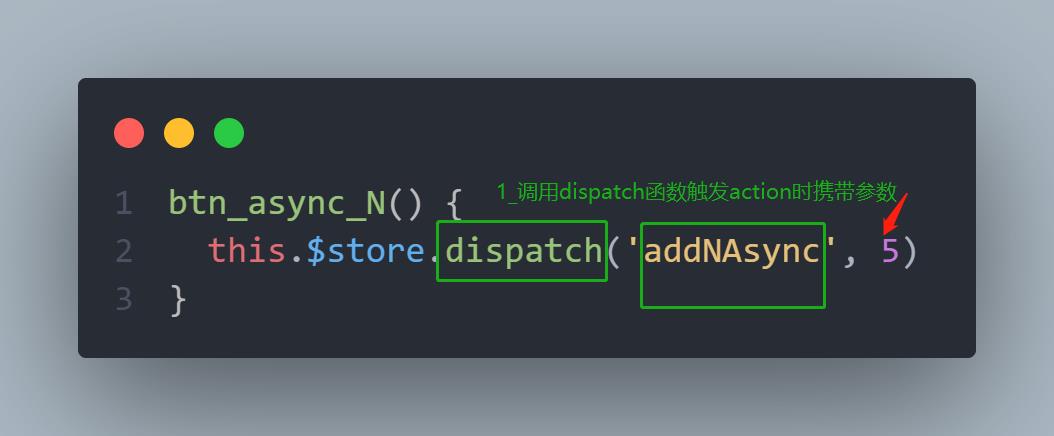
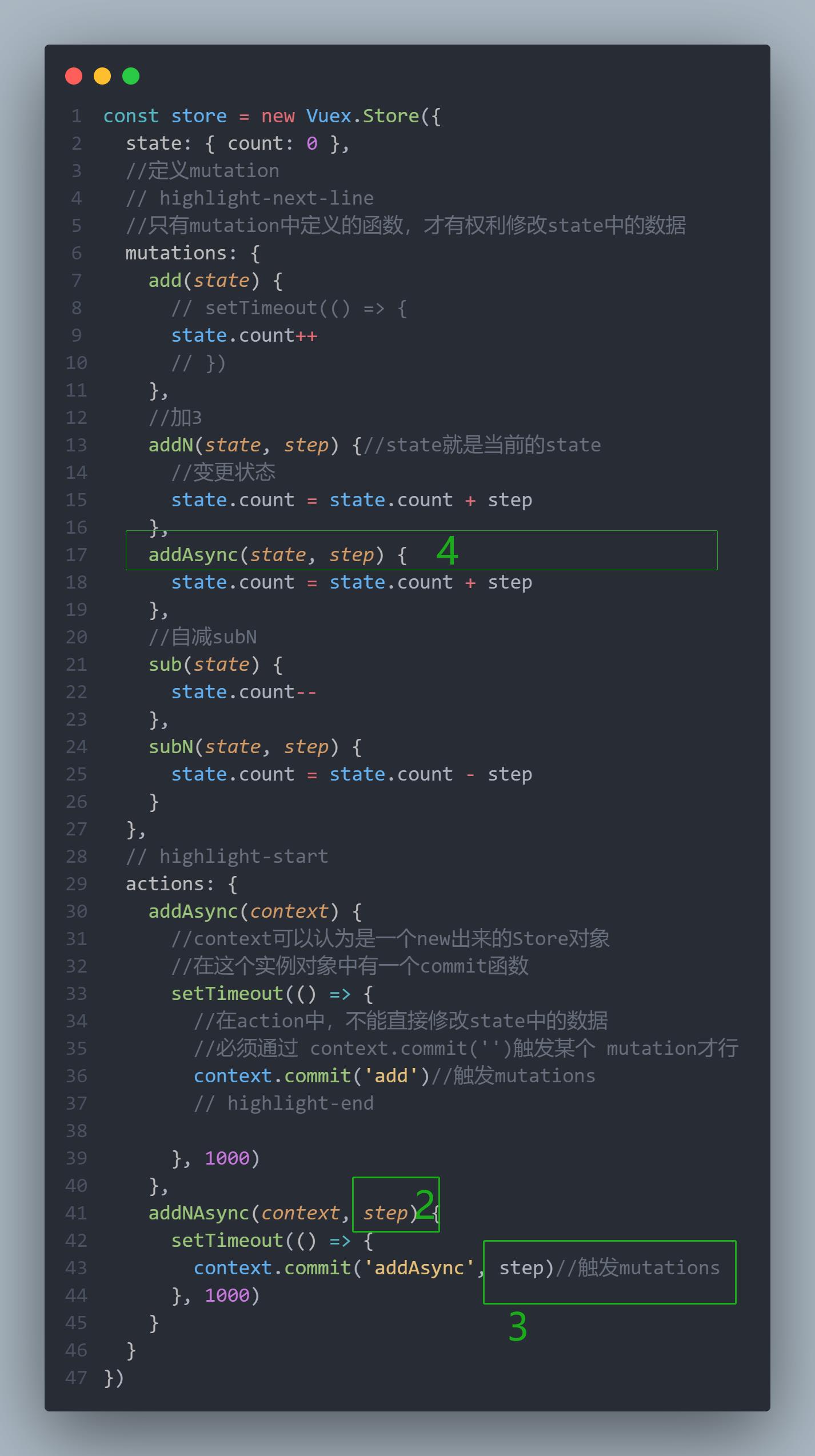
    btn_async_N() {
      this.$store.dispatch('addNAsync', 5)
    }
const store = new Vuex.Store({
  state: { count: 0 },
  //定义mutation
  //只有mutation中定义的函数,才有权利修改state中的数据
  mutations: {
    add(state) {
      // setTimeout(() => {
      state.count++
      // })
    },
    //加3
    addN(state, step) {//state就是当前的state
      //变更状态
      state.count = state.count + step
    },
    addAsync(state, step) {
      state.count = state.count + step
    },
    //自减subN
    sub(state) {
      state.count--
    },
    subN(state, step) {
      state.count = state.count - step
    }
  },
  actions: {
    addAsync(context) {
      //context可以认为是一个new出来的Store对象
      //在这个实例对象中有一个commit函数
      setTimeout(() => {
        //在action中,不能直接修改state中的数据
        //必须通过 context.commit('')触发某个 mutation才行
        context.commit('add')//触发mutations

      }, 1000)
    },
    addNAsync(context, step) {
      setTimeout(() => {
        context.commit('addAsync', step)//触发mutations
      }, 1000)
    }
  }
})
第二种触发方式
    subAsync(context) {
      setTimeout(() => {
        context.commit('sub')//触发mutations
      }, 1000)
    }
...mapActions(['subAsync']),
//将全局的 subAsync 映射为当前组件的一个methods
<button @click="subAsync">-1 Async</button>
-N
    subN_Async(context ,step) {
      setTimeout(() => {
        context.commit('subN',step)//触发mutations
      }, 1000)
    }
...mapActions(['subAsync','subN_Async']),
<button @click="subN_Async(5)">-N Async</button>
Getter
Getter用于对Store中的数据进行加工处理形成新的数据
Getter不会修改store的原数据,只起包装的作用
- Getter可以对Store中的已有的数据加工处理之后形成新的数据,类似Vue 的计算属性
- Store中数据发生变化,Getter的数据也会跟着变化
const store = new Vuex.Store({
  getters: {
    showNum: state => {
      return `当前最新的数量是 ${state.count}`
    }
  },
  state: { count: 0 },
}
使用getters 的第一种方式
this.$state.getters.showNum
<h3>当前最新count值为:{{ this.$store.getters.showNum }}</h3>
使用getters 的第二种方式
import { mapGetters } from 'vuex'

computed:{
    ...mapGetters(['showNum'])
}
<h3>当前最新count值为: {{ showNum }}</h3>